If you’re searching for clear, up-to-date insights on gaming trends, system setups, and performance optimization, you’re in the right place. The gaming landscape is evolving fast — from heated console vs PC debates to breakthroughs in Linux-compatible game engines and the growing impact of physics engines in games on realism and performance. It’s easy to get lost in conflicting opinions and outdated advice.
This article is designed to cut through the noise. We break down what actually matters: how modern gaming systems compare, what setup choices influence performance the most, and how underlying technologies shape your gameplay experience. Whether you’re optimizing your rig, exploring Linux gaming, or trying to understand how game mechanics truly work, you’ll find practical, research-backed insights here.
Our analysis is grounded in hands-on testing, technical documentation, and ongoing coverage of gaming hardware and software trends — so you can make informed decisions with confidence.
Beyond the Pixels: How Physics Engines Bring Game Worlds to Life
A skyscraper buckles, concrete shearing as debris cascades in Battlefield. Barrels tumble into a Combine soldier in Half-Life 2, triggering a perfect chain reaction. These moments feel cinematic, but they’re driven by physics engines in games.
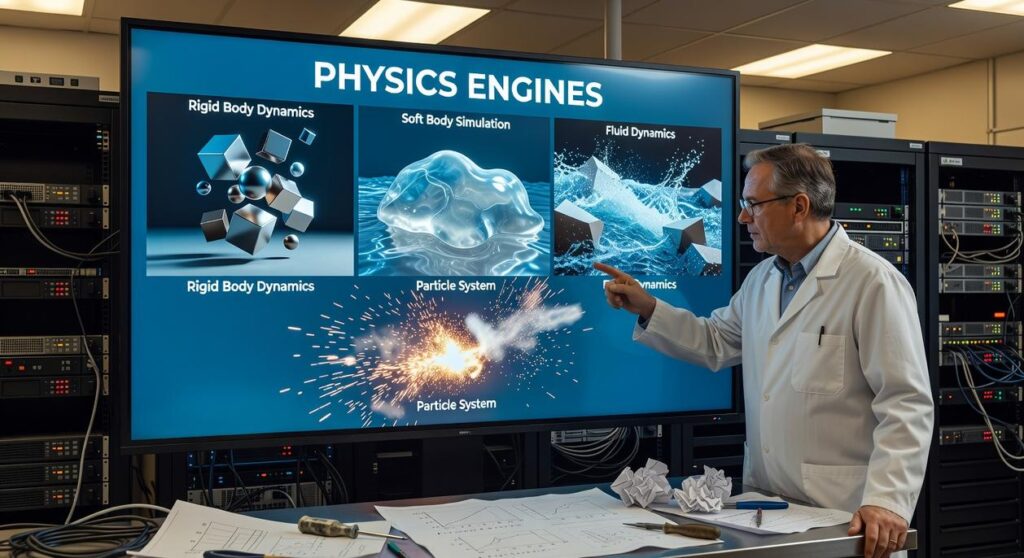
At their core, physics engines simulate real-world forces using:
- collision detection
- rigid body dynamics
- gravity and friction models
Havok powered over 600 titles, while NVIDIA PhysX benchmarks showed measurable realism gains in destructible environments. Studies link environmental interactivity to higher player immersion (Frontiers in Psychology, 2019). It’s not magic—it’s math, executed in milliseconds.
The Core Mechanics: What Makes a Digital World Feel Real?
I still remember the first time I tweaked gravity in a prototype and watched every crate float upward like a low-budget sci‑fi scene (funny for five seconds, immersion-breaking forever). That small experiment showed me how much subtle math shapes believable worlds.
Rigid Body Dynamics: The Foundation
At the heart of physics engines in games is rigid body dynamics—the simulation of solid objects that don’t deform. Key terms matter here: mass (how heavy something is), velocity (speed with direction), friction (resistance between surfaces), and gravity (the force pulling objects downward at 9.8 m/s² on Earth, per NASA). Picture a box sliding down a ramp. Increase friction, and it crawls; reduce mass, and it reacts faster to forces. Small tweaks, big feel differences.
Collision Detection
Next comes collision detection, which determines when objects touch. Simpler methods like AABB (Axis-Aligned Bounding Box) wrap objects in invisible boxes—fast but less precise. Mesh-based collision traces the actual shape, improving accuracy at a performance cost (a constant balancing act).
Constraints, Joints, and Ragdolls
Finally, constraints and joints connect objects—think hinges on doors or spring-based suspensions. And when characters collapse naturally, that’s ragdoll physics: interconnected rigid bodies reacting dynamically instead of following canned animations. It’s chaotic, unscripted—and oddly satisfying.
Titans of Simulation: A Look at Key Physics Engines

At their core, physics engines in games are like invisible stage crews. You never see them, but they’re the reason the chandelier falls convincingly instead of hovering like a confused balloon. Broadly speaking, developers choose between two approaches: integrated engines and middleware.
Integrated engines—such as Unreal’s Chaos—are built directly into a game engine. Think of them as a house with plumbing already installed. Everything is designed to work together, which often means smoother workflows and fewer compatibility headaches. On the other hand, middleware solutions are more like bringing in a specialist contractor. They’re separate tools plugged into a project, offering flexibility and, sometimes, deeper customization.
Take NVIDIA PhysX. It’s famous for GPU acceleration, meaning it can offload heavy calculations to the graphics card instead of the CPU. The result? More particles, richer destruction, and smoother simulations in major titles. Imagine upgrading from a bicycle courier to a fleet of sports cars—that’s the kind of performance leap GPU acceleration can provide (assuming the hardware supports it).
Meanwhile, Havok has long been the industry’s steady hand. Used in thousands of console and PC games, it’s known for rock-solid stability. If PhysX is the flashy sports car, Havok is the reliable touring sedan that just keeps running.
Then there’s Bullet Physics, the open-source powerhouse. Cross-platform and Linux-friendly, it’s a favorite among indie developers targeting multiple systems. It’s like a well-stocked toolbox anyone can access—adaptable, dependable, and refreshingly open.
From Immersion to Gameplay: The True Impact of Physics
Physics in games isn’t just about making things fall realistically. It’s about POSSIBILITY. When developers talk about emergent gameplay, they mean unscripted moments that happen because systems interact—not because a designer hard-coded them. Think of stacking crates to reach a rooftop instead of finding the “intended” staircase. The game didn’t plan it. The systems allowed it.
At the core of this are physics engines in games—software frameworks that simulate forces like gravity, friction, and momentum. In simple terms, they decide how objects move and collide. When tuned well, they let players experiment freely (and sometimes brilliantly break the rules).
Powering Environmental Puzzles
Games like Portal turn physics into the main mechanic. Momentum—mass in motion—lets you fling yourself across gaps. In The Legend of Zelda: Tears of the Kingdom, combining objects works because weight, balance, and torque are simulated in real time. These systems create:
- Player-driven solutions
- Multiple valid outcomes
- REPLAYABILITY through experimentation
Enhancing Realism and Destruction
Destructible walls or collapsing bridges raise the stakes. When cover can shatter, tension spikes (no one feels safe behind drywall). Real-time debris and structural damage also increase visual fidelity, grounding action in believable cause and effect.
The Feel of the Game
Physics dictates whether a car grips the road or slides like it’s on ice. It controls jump arcs, fall speed, and impact weight. Even multiplayer responsiveness connects here—see breaking down multiplayer netcode and server architecture for how simulation and synchronization intersect.
When physics is clear and consistent, gameplay feels FAIR. When it’s sloppy, immersion cracks instantly.
The Performance Trade-Off: Optimizing for Smooth Gameplay
I still remember testing a sandbox build that tanked from 120 FPS to 45 the moment I enabled full physics engines in games. The culprit? CPU-bound calculations—meaning the processor, not the graphics card, was overloaded handling collision detection, rigid body dynamics (how objects move and react), and real-time simulations. Physics often bottlenecks performance because every object demands constant math.
Developers fight back with smart tricks:
- Baking animations, simplifying collision meshes, and putting idle objects “to sleep.”
On PC, stronger CPUs allow richer simulations than fixed console hardware (a noticeable edge during chaotic scenes).
The unseen hand shaping favorite games is physics engines in games. They’re the invisible framework giving characters weight, explosions force, and worlds believable reactions. Without them, even blockbuster titles would feel like cardboard cutouts (and nobody wants that).
Understanding this tech sharpens your appreciation and helps you:
- Diagnose odd frame drops or collision glitches.
- Choose hardware that handles simulation-heavy scenes.
I’ll admit, the future is less certain. Developers promise richer fluid dynamics, soft-body physics, and AI-driven systems, but how soon they’ll scale smoothly is debated.
Still, pay closer attention next time you play, or experiment with Bullet yourself.
Level Up Your Game Performance Today
You came here to finally understand what’s really driving performance in modern titles—from graphics pipelines to physics engines in games—and now you have the clarity to make smarter decisions. Whether you’re debating console vs PC, fine-tuning your Linux setup, or optimizing every frame for competitive play, you’re no longer guessing.
The frustration of lag spikes, poor optimization, and incompatible tools can kill immersion and waste hours of effort. But when you understand how systems, engines, and hardware interact, you take back control of your gaming experience.
Now it’s time to act. Apply these optimization strategies, test your setup, and refine your configuration step by step. Don’t settle for choppy gameplay or underperforming builds.
If you’re serious about smoother performance, smarter setups, and staying ahead of the latest gaming tech trends, keep exploring our expert guides. We’re trusted by thousands of gamers for clear, no-fluff insights that actually improve performance.
Upgrade your setup, optimize your system, and start playing the way your games were meant to be played.